
 Blender
 Cinema 4D
 Arnold
 3ds Max
 Houdini
 V-Ray
V-Ray Maya
Maya Unreal Engine
 Nuke
NukeRotoscoping Guide for 3D Animation and VFX Artists

Rotoscoping is an animation and visual effects technique where artists trace over live-action footage frame by frame. In animation, it helps create lifelike movement. In VFX, it is often used to isolate people, objects, or background elements so they can be composited, enhanced, removed, or replaced.
For 3D artists, rotoscoping is still useful even in a world of motion capture, AI tools, and real-time engines. It can help match animated characters to live-action plates, create clean mattes for compositing, guide realistic body motion, and support complex shots where automatic tracking is not accurate enough.
What is Rotoscoping?
Rotoscoping, sometimes called roto, is the process of tracing over footage to create animation or a matte. The technique was developed by Max Fleischer in 1915 and was originally used to make hand-drawn animation feel more realistic.
Today, rotoscoping is mostly digital. Artists use software to draw masks around a subject, adjust the shape over time, refine edges, and separate that subject from the rest of the shot. The result can be used for rotoscope animation, VFX compositing, cleanup work, color correction, background replacement, or stylized animation.
In simple terms: if an artist needs to follow real movement very closely, rotoscoping is one of the most precise ways to do it.
What Are the Main Types of Rotoscoping?
Traditional Rotoscoping
Traditional rotoscoping is the original form of the technique. Artists trace over live-action footage frame by frame to create more realistic animated movement. Before digital tools, this was done by projecting footage onto a surface and drawing over each frame by hand.
This method takes time, but it gives animators strong control over timing, body movement, and performance details. Many classic animated films used live-action reference to make characters feel more natural while still preserving a stylized look.
Digital Rotoscoping
Digital rotoscoping uses software to create masks, mattes, and traced animation from live-action footage. Instead of drawing everything by hand on paper, artists work with digital tools that allow them to adjust shapes, add keyframes, refine edges, and track movement more efficiently.
This is the most common form of rotoscoping in modern animation and VFX. It is used for isolating actors, removing objects, replacing backgrounds, adding effects, and preparing shots for compositing.
Rotoscope Animation
Rotoscope animation focuses on turning live-action movement into animated footage. Artists trace the performance and then stylize the final image, which can result in anything from realistic character motion to a painterly, graphic, or surreal visual style.
This type is often used in films, games, commercials, and music videos when creators want movement that feels grounded in reality but still has a strong artistic identity.
VFX Rotoscoping
VFX rotoscoping is mainly used to separate a subject or object from the rest of a shot. Artists create a matte around actors, props, vehicles, or foreground elements so they can be composited with CG assets, new backgrounds, color effects, or digital environments.
This type of roto is often invisible when done well. The audience may not notice it, but it is essential for clean composites, background replacement, object removal, and many visual effects shots.
Roto-Assisted 3D Workflow
In 3D production, rotoscoping can be used as a reference or support tool. Artists may use live-action footage to guide character animation, match CG elements to a real plate, or separate foreground and background layers before compositing rendered 3D objects into the scene.
This is especially useful when a shot combines live-action footage, 3D animation, camera tracking, lighting, and final rendering. Rotoscoping helps the CG elements sit more naturally inside the finished shot.
How Does Rotoscoping Work?
It is important that you understand how rotoscope animation works before you attempt to create something similar. The following is a go-through of how rotoscoping works in the market.
1. Prepare the Source Footage
The process starts with live-action footage. For better results, artists usually choose footage with clear lighting, readable silhouettes, and enough contrast between the subject and background.
In a professional animation or VFX workflow, the team may also prepare camera data, reference frames, shot notes, frame ranges, and plate versions before roto work begins.
2. Create Masks or Mattes
The artist draws a mask around the subject or object that needs to be isolated. For a person, this may include separate shapes for the head, torso, arms, hands, legs, hair, and clothing.
Breaking the subject into smaller shapes gives the artist more control. A single large mask may be faster at first, but it can become difficult to manage when the subject bends, turns, runs, or moves through motion blur.
3. Track the Movement Frame by Frame
After the first mask is created, the artist adjusts it across the shot. Some software can help track the motion automatically, but manual cleanup is usually still needed, especially around hair, transparent objects, fast movement, overlapping limbs, and soft edges.
This is where rotoscoping becomes detailed work. Good roto should not wobble, cut into the subject, or leave visible edge problems after compositing.

4. Refine Edges and Motion Blur
Clean edges are essential. Artists may feather the mask, adjust edge softness, and match the amount of blur in the original footage. If the subject moves quickly, the matte needs to follow that blur instead of creating a sharp cutout.
This step matters because a bad matte can make even a good effect look fake. In VFX, the audience may not notice good roto, but they will notice bad roto immediately.
5. Composite, Animate, or Add Effects
Once the matte is ready, the subject can be placed into a new background, combined with 3D elements, color graded separately, transformed into stylized animation, or used for effects such as glows, portals, explosions, smoke, or digital makeup.
For 3D artists, roto often works alongside camera tracking, matchmoving, lighting, render passes, and compositing. The goal is not only to isolate an object, but to make the final shot feel believable.
6. Render and Review the Final Frames
After compositing and effects are added, the shot needs to be rendered and reviewed. Artists usually check the sequence frame by frame for edge errors, matte chatter, missed details, and inconsistencies between shots.
For larger animation or VFX projects, final rendering can put pressure on local machines, especially when the scene includes 3D characters, simulations, high-resolution textures, multiple passes, or long frame ranges. In that stage, a cloud rendering service can help teams render final frames more efficiently.
Rotoscoping in 3D Animation and VFX
Rotoscoping is not limited to 2D animation. It also plays an important role in 3D production and visual effects.
Realistic Character Animation
Animators can use live-action footage as reference for natural movement. This is useful for running, jumping, fighting, dancing, facial expressions, and subtle body shifts that are hard to animate from imagination alone.
VFX Compositing
Roto is widely used to separate actors, props, vehicles, and foreground elements from a plate. Once isolated, those elements can be placed in front of CG backgrounds, affected by digital lighting, or combined with rendered 3D assets.
Scene Cleanup and Object Removal
If a shot contains wires, tracking markers, unwanted props, or background distractions, rotoscoping can help isolate the area that needs to be cleaned or replaced.
Virtual Production and Previsualization
During previs or virtual production, roto can help artists test shot composition, separate live-action plates, and plan how 3D elements will interact with real footage.
Stylized Animation
Some projects intentionally use rotoscope animation for a distinctive look. The movement feels grounded in reality, while the final image can be painterly, graphic, surreal, or hand-drawn.
Rotoscoping vs Motion Capture vs Masking
In real production, these techniques often work together. A VFX shot may use motion capture for a CG creature, keying for green screen footage, and rotoscoping to fix edges or isolate details that the key cannot handle cleanly.
| Technique | Best For | Main Difference |
|---|---|---|
| Rotoscoping | Tracing footage or creating mattes frame by frame | Most precise for visual isolation and stylized tracing |
| Motion capture | Recording body or facial performance as data | Faster for character motion, but needs cleanup and retargeting |
| Masking | Hiding or revealing part of an image or layer | A broader compositing task; roto is often a more detailed form of masking |
| Keying | Removing a green or blue screen background | Faster when footage is shot cleanly, but less useful for uncontrolled backgrounds |
Best Rotoscoping Software for Artists
Adobe After Effects
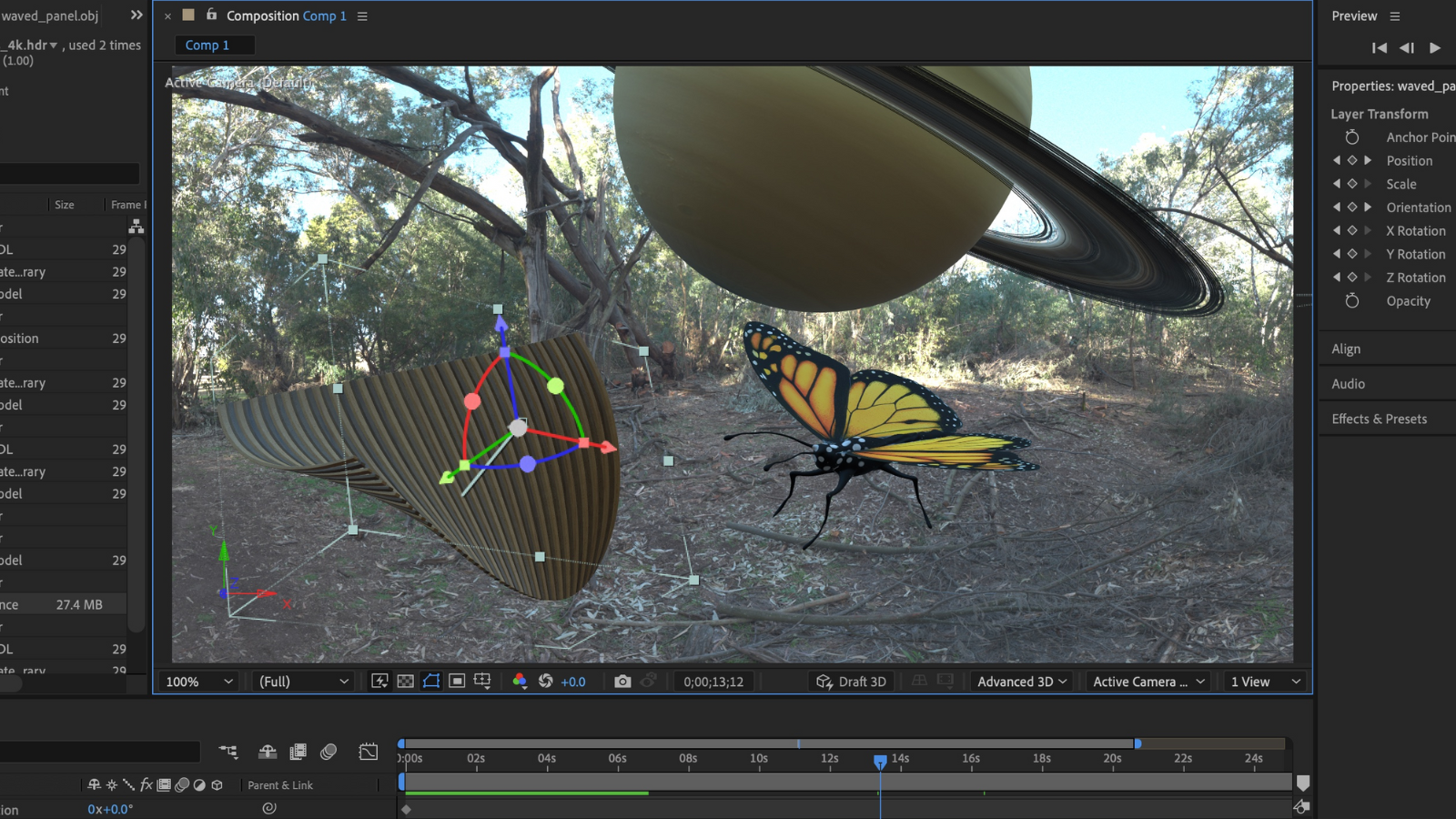
Adobe After Effects is one of the most accessible tools for rotoscoping, especially for motion designers, video editors, and small animation teams. Its Roto Brush tool can help isolate subjects from footage, while masks and keyframes give artists more manual control when automatic results need cleanup.
After Effects is a good choice for short shots, motion graphics, commercial videos, and basic VFX work. It is also widely used because it connects easily with other Adobe tools such as Premiere Pro and Photoshop.
Mocha Pro
Mocha Pro is known for planar tracking, which makes it useful for rotoscoping objects that move across surfaces or change perspective. Instead of only following individual points, Mocha tracks flat areas, making it effective for screen replacement, object removal, beauty work, and complex matte creation.
It is often used alongside After Effects, Nuke, and other compositing tools. For artists who need stronger tracking support, Mocha Pro can save time on shots where manual frame-by-frame masking would be too slow.
Silhouette
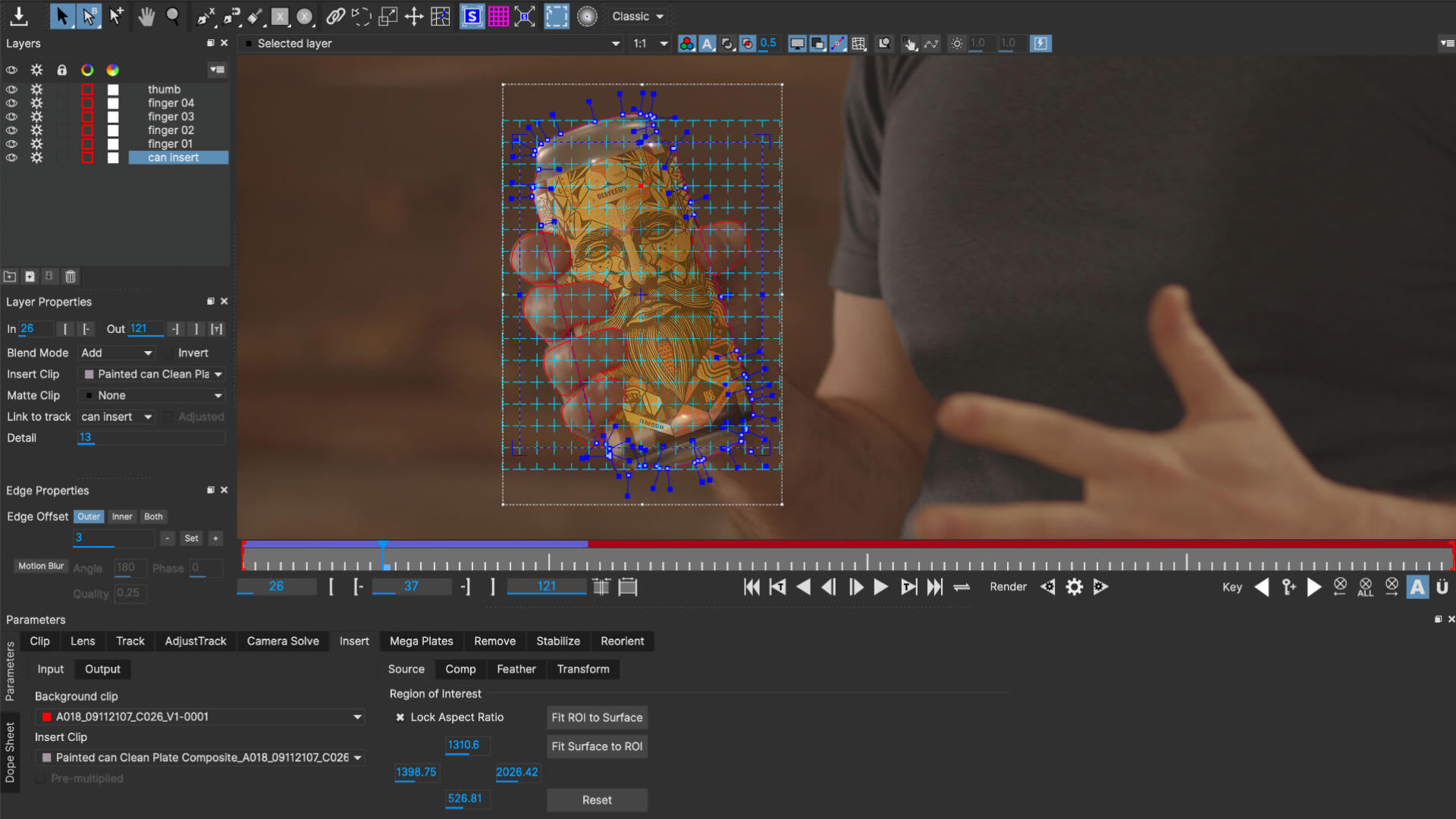
Silhouette is a professional roto and paint tool used in film, television, and high-end VFX pipelines. It is built for detailed matte work, paint cleanup, object removal, and shot repair. Artists can create precise shapes, manage complex roto layers, and refine edges for demanding compositing work.
Silhouette is best suited for advanced artists and studios that need production-level control. It is especially useful when a shot includes hair, motion blur, overlapping limbs, or other difficult edge details.
Nuke
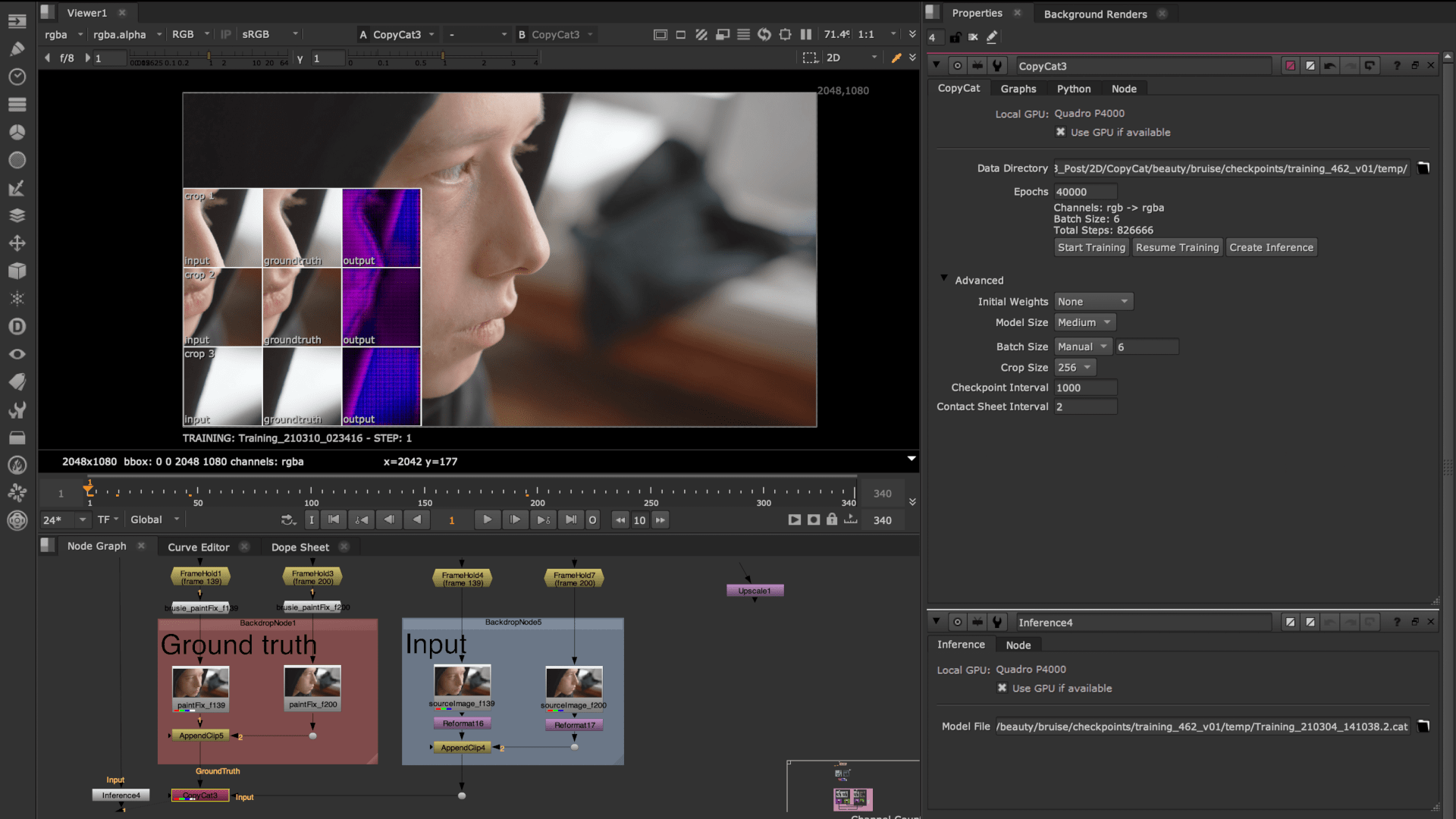
Nuke is a node-based compositing tool widely used in professional VFX. While it is not only a rotoscoping tool, it includes strong roto, tracking, keying, and compositing features that make it valuable for complex shots.
Artists often use Nuke when rotoscoping needs to connect directly with CG elements, render passes, color correction, 3D camera data, and final compositing. It is a strong option for film, episodic work, and larger VFX pipelines.
Fusion
Fusion, available inside DaVinci Resolve and as a standalone tool, offers node-based compositing with masking, tracking, keying, and visual effects features. It can be useful for artists who want roto and compositing tools within an editing and finishing workflow.
Fusion is often a good fit for indie filmmakers, editors, and smaller teams that need more advanced compositing than a layer-based editor can provide, but may not require a full high-end VFX pipeline.
Blender
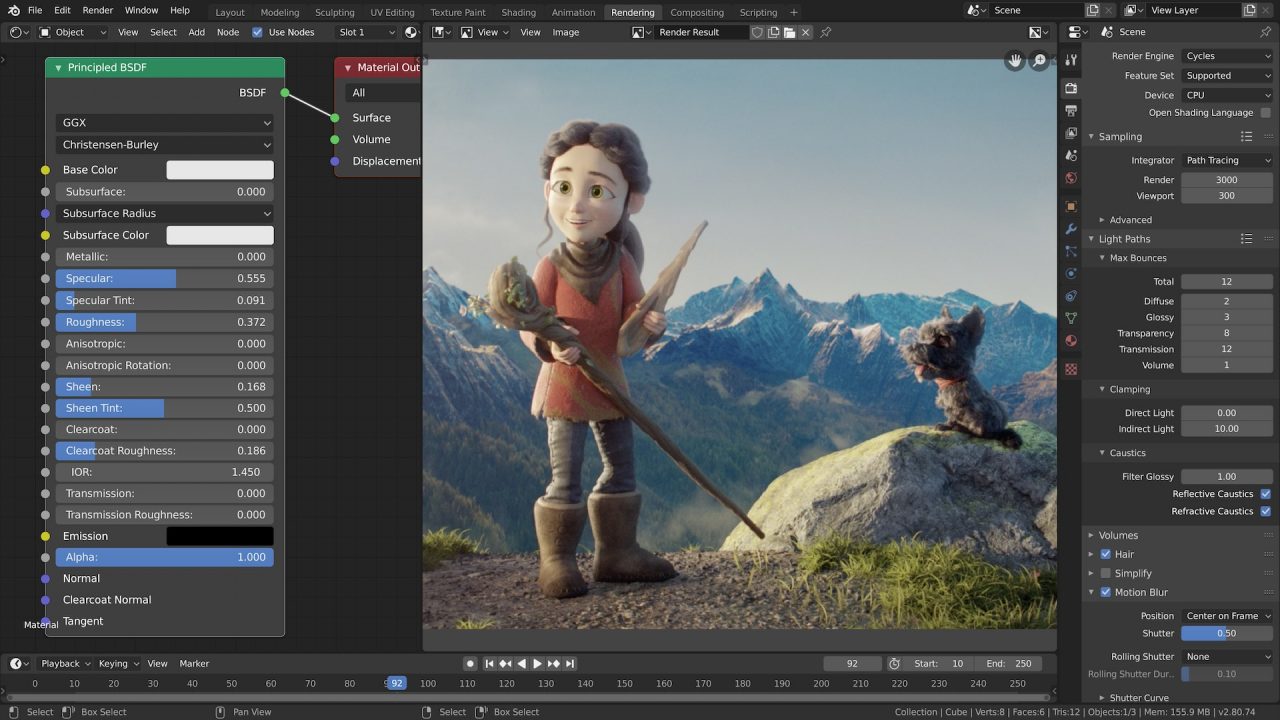
Blender is best known as a 3D creation suite, but it also includes tools for masking, tracking, compositing, and animation. For 3D artists, this can be useful when rotoscoping is part of a broader workflow involving camera tracking, CG objects, animated characters, and rendered scenes.
Blender is a practical option for artists who want to keep more of the production process inside one free, open-source tool. It may not replace dedicated roto software for high-end VFX shots, but it can be very effective for smaller projects, previs, and 3D-assisted compositing.
Popular Examples of Rotoscope Animation
1. Alice in Wonderland
Disney animators used live-action reference to guide movement and performance in many classic animated films. For films such as Alice in Wonderland, this helped characters move with more natural timing while still fitting into a stylized animated world.

2. Star Wars
The original Star Wars lightsaber effects are one of the most famous uses of rotoscoping in visual effects. Artists traced over the prop blades frame by frame and added the glowing energy effect in post-production.

3. Prince of Persia
The original Prince of Persia game used rotoscoped reference footage to create unusually fluid character movement for its time. The result gave the game a more lifelike feeling than many earlier platform games.

4. The Lord of the Rings
Ralph Bakshi’s 1978 animated film The Lord of the Rings used rotoscoping heavily, giving the film a distinctive look that mixed live-action movement with animated imagery.

5. Modern VFX and Animation
Today, rotoscoping appears in films, series, commercials, games, and music videos. Even when audiences do not recognize it, roto is often part of the invisible work behind clean composites and believable visual effects.
Where Rendering Fits Into the Rotoscoping Workflow
Rotoscoping itself is usually part of animation, compositing, or post-production. But once the shot includes 3D characters, CG environments, simulations, lighting, and final compositing, rendering becomes a major production step.
For small shots, local rendering may be enough. For longer sequences, tight deadlines, or high-resolution final frames, artists may need extra render capacity. Fox Renderfarm supports CPU and GPU cloud rendering, multiple 3D tools and renderers, and production workflows that need scalable rendering power.
This is especially helpful when a project involves 3D animation, VFX shots, or composited sequences that need to be reviewed and delivered quickly. Artists working with Nuke-based compositing can also refer to the Nuke render farm solution for supported workflow details.

FAQ About Rotoscoping
What is rotoscoping?
Rotoscoping is a technique where artists trace over live-action footage frame by frame. It can be used to create realistic animation, isolate subjects for VFX, build mattes, or support compositing work.
Is rotoscoping still used today?
Yes. Rotoscoping is still used in animation, film, television, commercials, games, and visual effects. Digital tools have made the process faster, but artists still use manual roto for shots that need precision.
Is rotoscoping the same as motion capture?
No. Motion capture records performance data, while rotoscoping traces or isolates visual footage frame by frame. Both can support realistic movement, but they are different techniques.
What is rotoscoping used for in VFX?
In VFX, rotoscoping is often used to create mattes, isolate actors or objects, replace backgrounds, clean up shots, and combine live-action footage with CG elements.
What software is used for rotoscoping?
Common rotoscoping tools include After Effects, Mocha Pro, Silhouette, Nuke, Fusion, and Blender. The right software depends on whether the work is for motion graphics, professional compositing, animation, or 3D production.
Conclusion
Rotoscoping has been part of animation and visual effects for more than a century, but it remains relevant because it solves a practical problem: real footage is complex, and not every shot can be handled cleanly by automatic tools.
For 3D artists and VFX teams, rotoscoping can improve motion reference, support compositing, isolate difficult subjects, and help live-action and CG elements sit together more convincingly. When the final sequence becomes render-heavy, cloud rendering can also help keep delivery on schedule without relying only on local hardware.