


The Method to Make LightGroup of Arnold 5.1
A friend asked me before, how to make LightGroup in Arnold 5.1 version, because with LightGroup, we do not need to divide the Light Render Layer.
The method of Arnold 5.1's LightGroup is not the same as the previous version. I remember that the LightGroup property was added to the light at the beginning. This method only works for the alshader's shader, and then the light property bar is added in the AOV Light Group column, add LightGroup1 by ourselves in the AOV attribute, and apply the L.'LightGroup' command. After the Arnold 5.1 version, it was found that this method has failed. Even if you add the L.'LightGroup command to AOV, still not working. Next, let me talk about how Arnold 5.1 makes LightGroup.
The first step is to create a light. In the AOV Light Group property column of the light, give it a name that you want of this LightGroup, I name it LGT_A here.

The second step is to add the RGBA (cloud rendering note that, it is must in uppercase) channel to the AOV channel. Why should we add the RGBA channel? Because I found that only the RGBA channel has its Light Group List property bar showing its effect. If you add a LightGroup channel, you will find that this property is in the closed state, and this RGBA must be uppercase, quite fucking. Then enter the RGBA channel properties and select the LightGroup you added to the Light Group List option. My scene made 3 lights, so there are three.

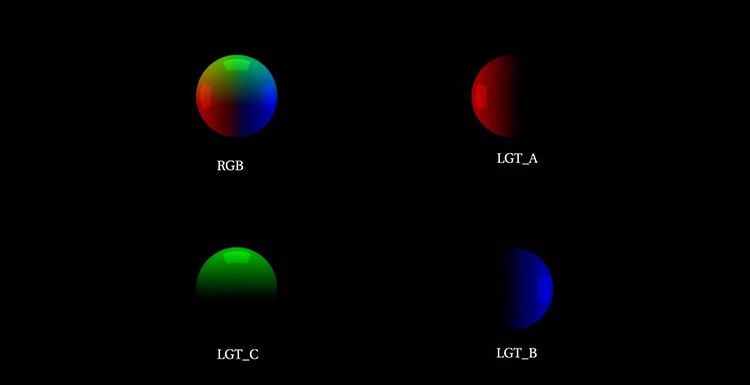
LightGroup appears after the rendering below.
Here is the rendering of render farm test: